MTxDownloader - Bulk Video Media Vault & Queue Manager
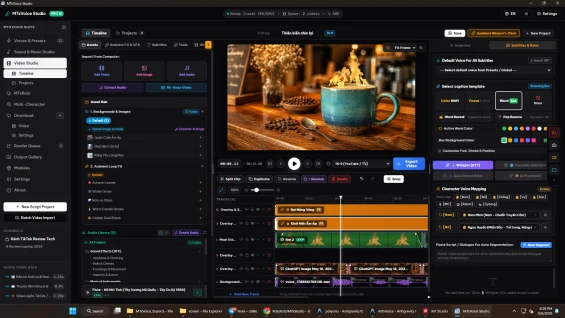
286.61 msMTxDownloader accelerates video asset ingestion and workflow organization for digital content creators by pairing a multi-platform bulk downloading engine with hardware-aware resource throttling and automated audio extraction. Integrated seamlessly into MTxStudio, this utility transforms scattered web video links into structured, categorized media libraries ready for transcription, voiceover, and multi-track editing without freezing your operating system.
Multi-Platform Bulk Scraping and High-Resolution Capture
Modern video creation requires gathering reference footage, background b-roll, trending audio, and social media clips from multiple online sources. Manually downloading individual videos through ad-filled websites wastes hours of productive editing time.
MTxDownloader supports automated multi-link batch processing across all major video distribution platforms:
- Global Social Platforms: YouTube (videos, shorts, playlists), TikTok, Facebook Reels, Instagram (reels, video posts), X (formerly Twitter), Vimeo, and direct MP4/M3U8 media links.
- East Asian Media Networks: Full native parsing support for Douyin and short-video portals, preserving original uncompressed video streams.
- Flexible Resolution Selection: Download original source quality, full HD 1080p, or optimized 720p footage based on project requirements and available storage space.
Hardware-Aware Rolling Queue and System Safety Cap
Downloading high-bitrate video streams concurrently can easily overwhelm computer processors, exhaust available RAM, and freeze editing software. MTxDownloader introduces an intelligent telemetry-driven concurrency controller:
- 90 Percent Hardware Safety Ceiling: Continuously monitors real-time CPU usage, physical RAM occupancy, and available memory headroom. When resource consumption exceeds safe operational limits (default 90%), active download threads automatically throttle to prevent system lag.
- Dynamic Rolling Queue: As high-priority downloads finish, queued background tasks start sequentially without causing network saturation or operating system lockups.
- Resilient Recovery Engine: Interrupted or stalled downloads resume automatically from the last valid byte offset, eliminating duplicate downloads and corrupted files.
Automated Audio Extraction and Watermark Cleanup
Preparing downloaded videos for voiceover localization usually requires running secondary FFmpeg conversion commands. MTxDownloader automates this entire pipeline during the download process:
- Automatic Audio Extraction: Simultaneously extracts high-quality audio tracks (WAV or MP3) from incoming videos, immediately making dialogue stems available for Whisper AI speech-to-text transcription.
- Automated Watermark Normalization: Built-in post-processing strips platform watermark overlays, providing clean visual plates suitable for creative re-editing.
- Preserved Metadata Vault: Automatically archives video titles, author usernames, duration, original aspect ratios, source links, and thumbnail graphics into a local SQLite repository.
Hierarchical Asset Organization and Timeline Interoperability
Media management remains organized even when collecting hundreds of research clips:
- Nested Category Tree: Create custom multi-level folder structures to organize videos by niche, client account, platform source, or thematic collection.
- Instant Search and Filtering: Quickly filter downloaded video assets by platform, download status, file size, or keywords.
- 1-Click Video Editor Insertion: Send downloaded video footage or extracted soundtrack stems directly onto the active MTxStudio multi-track timeline with a single click.
- Local Privacy and Independence: All video assets, thumbnails, and metadata records reside on your local physical drives, ensuring total data privacy and zero dependence on third-party cloud hosting.
What We're Working On
No feature updates scheduled currently.
Recent Releases
MTxDownloader v1.0.0 establishes automated video ingestion for the MTxStudio desktop suite:
- Unified multi-platform video parser supporting YouTube, TikTok, Facebook, Instagram, Douyin, and X.
- Intelligent hardware safety cap throttling concurrency when system CPU or RAM exceeds 90%.
- Hierarchical SQLite-backed category organization for video assets.
- Instant automated audio track extraction (WAV/MP3) for Whisper STT workflows.
- Metadata vault preserving creator handles, resolutions, durations, and thumbnails locally.
- Direct 1-click insertion into the MTxStudio Video Editor multi-track timeline.
- Resilient byte-level download resumption on network interruption.
Looking for full roadmap, documentation, or interactive release logs?
Explore Our Project PortalFor products sold outside the site - for example, polyxgo on Envato (CodeCanyon.net) - we are the exclusive authors under Envato’s platform. These products can only be sold and supported on Envato. Therefore, you cannot purchase them elsewhere if you wish to receive our official support and updates.
Even if your support period has ended, we will still answer your current technical questions related to the module. However, for any requests that involve bug fixing, troubleshooting, integration, or hands-on assistance, you will need to renew your support first. We hope you understand this requirement. More details: https://help.market.envato.com/hc/en-us/articles/208191263-What-is-Item-Support
Yes. We handle feature integration based on customer requirements and descriptions. If a module has the features you need, you can send a separate request to polyxgo@gmail.com
You can download the product through the purchase receipt or your account dashboard right after you log in at https://headrandom.com/account/login. Installation steps are included in the documentation folder.
For products on Envato (Codecanyon) access the Download section after you log in.
Yes, we provide basic installation and setup support for all purchased products.
Usage depends on the license type. Standard licenses typically allow one installation per purchase.
Updates are delivered through your account dashboard or marketplace where you purchased the product.
Please send us details, screenshots, and steps to reproduce the issue so our support team can assist you. You can create tickets on the system or email polyxgo@gmail.com.
Support duration follows the policy of the marketplace or package you purchased, typically 6–12 months.
Yes, all products include documentation to help you install and use the features. The data is connected to the system for each corresponding product project, and the documentation always provides the latest feature information and instructions from the project.
Yes, we offer custom development based on your requirements. For products sold exclusively and features already available on products listed on Envato, we integrate the additional features and update them through Envato. Only completely different features that require separate handling based on specific business workflows will be processed as a standalone service according to your detailed requirements.
Yes, we provide a live demo so you can test features before purchasing.
You can renew support through your marketplace account or by contacting us directly.
Non-profit organizations, charities, and community initiatives supporting elderly people, children, people with disabilities, and other vulnerable groups are always welcome to reach out to us.
If your organization uses Perfex CRM and requires any of our modules, plugins, or related products, we will gladly provide assistance with installation, customization, training, and long-term operation.
As part of our commitment to supporting meaningful social impact projects, we offer lifetime free support for all products used by eligible non-profit organizations. Our goal is to help you streamline operations, reduce technology costs, and focus more resources on serving your community.
For inquiries and support, please contact us at polyxgo@gmail.com. We will do our best to assist your organization as quickly as possible.
Ratings Source Breakdown
Related Products