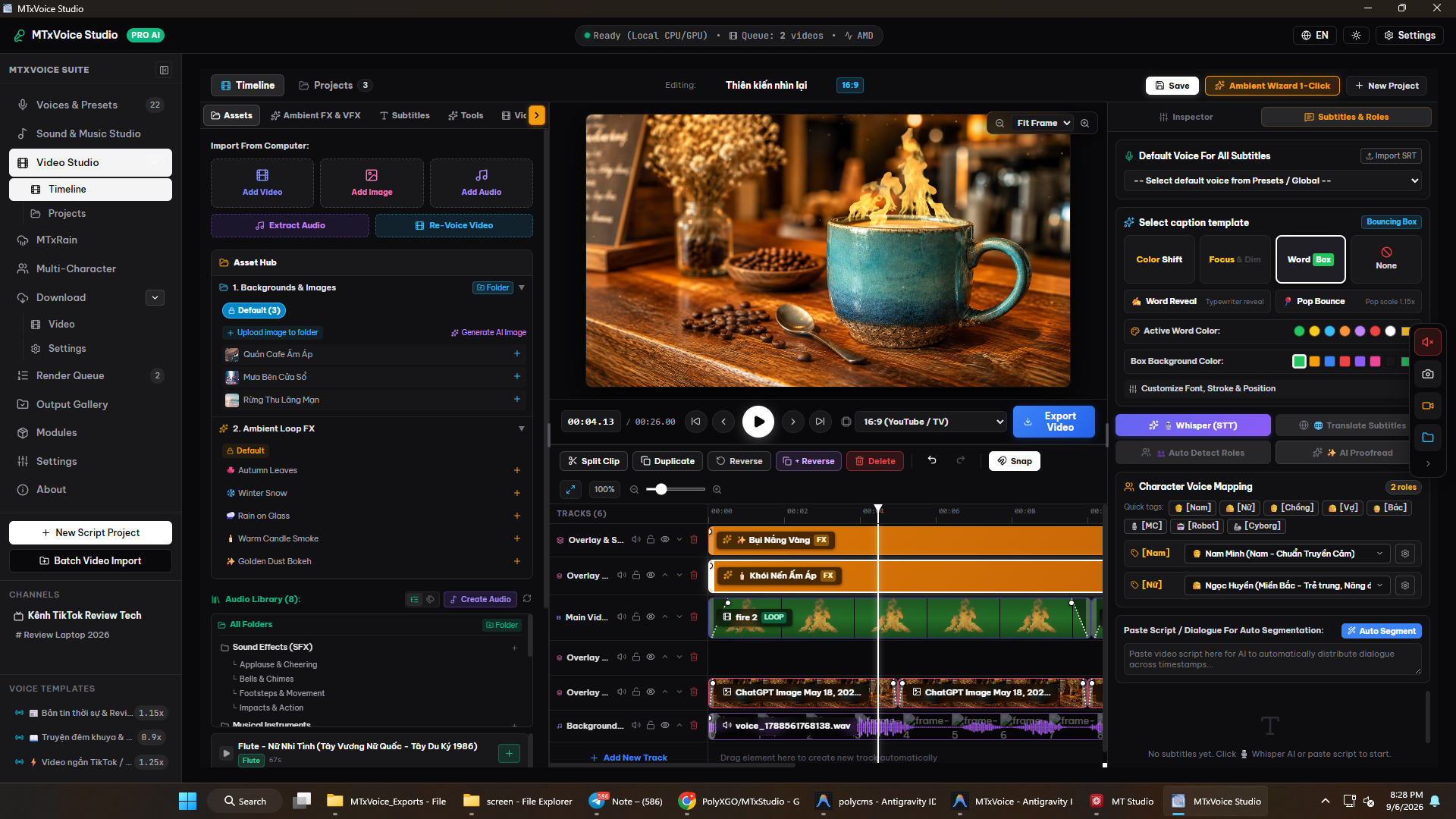
MTxStudio - AI Video Voiceover & Multi-Track Studio
280.33 msMTxStudio is a free, cross-platform software solution originally developed to support my own learning and content creation workflow for producing and monetizing videos across Facebook, YouTube, and TikTok. The project is built with the goal of providing myself, beginners, and creators who may not have access to expensive commercial production software with a practical, capable toolkit for experimenting with ideas, building channels, and developing their own content workflows.
MTxStudio provides comprehensive support for Windows and macOS, offering an end-to-end production workflow that covers automated AI video voiceover, instant voice cloning, multi-character dialogue production, traditional instrument sound studios, and multi-track timeline video editing.
Rather than focusing solely on conventional manual video editing, MTxStudio is designed around semi-automated production workflows for common and repeatable video templates. Its primary goal is to automate repetitive production tasks wherever practical, minimize unnecessary manual work, and allow creators to focus more on content, ideas, and creative decisions.
Batch AI Video Voiceover & Whisper Transcription
MTxStudio automates the complete re-voicing workflow from raw source videos:
Multi-Source Video Ingestion: Automatic downloading via
yt-dlpfrom social media platforms or batch local file imports (.mp4,.mov,.mkv,.avi,.webm).Precise Whisper STT Transcription: Uses Faster-Whisper and WhisperX to recognize each sentence with millisecond-level timecodes and automatically detect the source language. However, the generated transcription generally still needs spelling and wording adjustments before use, either with AI assistance or through direct manual review. Fully automating this step is currently not recommended, as accuracy may be reduced and the resulting content can remain repetitive or too similar to the original, even after automated rewriting. At this stage, we recommend using AI to rewrite the transcript while manually reviewing, adjusting, expanding, and adding creative elements based on the original content. You can also insert custom intro audio and channel-specific CTAs. Spending a little more effort on this step helps produce more polished content and provides a small but meaningful competitive advantage over fully automated workflows, which are more likely to result in poor content performance.
Multi-Provider AI Translation: Connects OpenAI (GPT-4o), DeepSeek (V3, R1), Google Gemini (1.5 Pro, 2.0 Flash), Anthropic Claude (3.5 Sonnet), and local Ollama models.
AI 1-Click Polish: One-click Vietnamese spell checking, punctuation correction, and natural spoken dialogue refinement.
Visual Review Studio: Parallel timeline view of original and translated lines, direct text editing, line splitting, line merging, non-verbal expression tags insertion, and segment audio audition before approval.
OmniVoice Synthesis & Zero-Shot Voice Cloning
Next-generation audio intelligence running locally on your hardware:
OmniVoice Diffusion LM Engine: High-fidelity speech synthesis supporting CPU bfloat16 and GPU CUDA float16 acceleration.
Zero-Shot Voice Cloning: Requires only a 3 to 10 second audio reference to extract unique vocal acoustic embeddings (Voice ADN) and save as reusable Voice Presets.
Multi-Attribute Voice Design: Flexibly configure voices across 5 attribute dimensions: Gender, Age, Pitch, Expression Style (whisper, standard), and over 20 regional accents and dialects.
Voice Identity Seed Lock: Lock the generative Seed to ensure persistent, identical character timbre across episodic series.
Non-Verbal Expression Tags: Insert physiological voice nuances directly into scripts:
[laughter],[sigh],[surprise-ah],[dissatisfaction-hnn].
Multi-Character Conversation Studio
Chat Bubble Timeline Editor: Intuitive conversation timeline interface with individual avatar representations and distinct color coding for each speaker.
Character Cast Manager: Assemble custom AI cast profiles with assigned voices, pitch contours, speeds, and Seed locks, reusable across podcast episodes and audio dramas.
Natural Interaction Tuning: Calibrate inter-turn conversational pauses (300ms - 800ms) and natural speech overlap thresholds.
Versatile Audio Exporting: Export unified audio mixes, isolated per-character multi-track stems, or inject directly into video tracks with speaker name subtitle overlays.
Professional Multi-Track Video Editor
Multi-Track Timeline: Independent management of Video Tracks, Voiceover Tracks, Background Music Tracks, Subtitle Tracks, and Overlay Image Tracks.
Studio Editing Suite: Millisecond-accurate playhead, smart magnetic snapping, clip splitting (
Ctrl + B), clip duplication (Ctrl + D), head/tail trimming, and multi-level Undo/Redo history.Canvas Preview & Transform Bounding Box: Real-time 2D/WebGL preview with on-canvas bounding box controls for dragging position X/Y, scaling, and rotating clips directly.
Multiple Aspect Ratio Support: Seamlessly toggle between 16:9 (YouTube, TV), 9:16 (TikTok, Shorts, Reels), 1:1 (Square), 4:3, and 3:4.
Auto Subtitle Editor with Per-Line Voice Override: Automatic sentence segmenting by timestamp, default voice assignment, and per-line voice overriding for distinct dialogue roles, coupled with 1-click Batch TTS synthesis.
Integrated AI Image Generator: Enter prompts to synthesize AI artwork (DALL-E 3, Gemini Imagen, Stable Diffusion) and place directly onto timeline tracks.
Hardware-Accelerated Export Engine: FFmpeg Complex Filtergraph pipeline exporting 720p HD, 1080p Full HD, and 4K Ultra HD videos with NVENC, Intel QuickSync, AMD AMF, and Apple Silicon VideoToolbox acceleration.
Sound Studio, Heritage Instruments & Meditation Audio
Bamboo Flute & Xiao Studio: Full support for standard flutes (C5, D5, E5, F5, G5, A4, Bb4, Xiao F4, C4), Vietnamese Cam Am note converter (
VietnameseCamAmConverterrecognizing Do2, Sol2, Mi2, Fa2, Do3, lasol), automatic Transpose Tone when switching flutes, portamento glides, vibrato LFO, and authentic breath chiff noise.Vision Sheet Music Scanner: AI vision OCR scanning printed sheet music or camera snapshots to parse notes and Solfege into the flute and guitar editors.
Saxophone Studio: Kenny G soprano, alto, and tenor saxophone physical modeling with scoop inflections, expressive vibrato, and nocturnal subtone warmth.
Vietnamese Heritage Instruments: Dan Bau with portamento bending and pure harmonics, Dan Tranh with 16-string sweeps and tremolo picking, and Dan Nguyet with courtly fret-pressing dignity.
Karplus-Strong Classical & Fingerstyle Guitar: Masterful guitar techniques including slap palm percussion, natural harmonics, tremolo picking, rasgueado strums, and chord rolls (Sunflower Paddy Sun 145 measures complete, Echoes Between the Lands).
ChordPro & Lead Sheet Editor: ChordPro notation (
[Am],[G],[C]) combined with vocal lyrics across 10 musical genres and 8 accompaniment rhythms.Zen Spa & Sound Therapy: Tibetan singing bowls, wind chimes, temple wooden fish (muyu), Solfeggio healing frequencies (432Hz, 528Hz), forest streams, and natural rainfall.
Silent Video Visual Intelligence (VLM)
AI Vision Frame Analysis: Automatic keyframe extraction using FFmpeg scene cut detection, analyzed through Moondream2, Florence-2, Qwen2.5-VL, and Google Gemini Vision for scene context, character actions, and emotional atmosphere.
Contextual Narration Scripting: Automatically synthesizes timecode-matched scripts tailored to specific presentation styles: Storytelling, Product Review, Documentary, or Instructional.
Global Script Smoothing: Merges fragmented scene descriptions into a coherent, captivating storyline ready for Review Studio TTS synthesis.
AI Singing Engine & Screen Recorder
AI Singing Engine: Integrates AceStep and DiffSinger services to manipulate F0 pitch curves, vocal vibrato, and syllable articulation from musical notes and lyrics, featuring automatic harmonic backing generation.
App Showcase Screen Recorder: Sleek floating action button (FAB) for native high-definition 30 FPS full-screen capture via FFmpeg (
gdigrabon Windows,avfoundationon macOS) or canvas stream chunks, recording system audio and microphone inputs simultaneously intoMTxStudio_Recordings.
Local Relational Storage & Multi-Threaded Batch Rendering
Comprehensive Source Traceability: Trace rendered video files back to raw video URLs, Whisper transcripts, AI translations, approved scripts, Voice Templates, and render timestamps.
Organized Project Tree: Hierarchical categorization: Channel -> Category -> Project.
Secure Local SQLite3 Storage: Persistent on-device relational database for configurations, scripts, projects, and custom pronunciation lexicons with zero cloud exposure.
Concurrent Batch Render Queue: Decoupled multi-threaded job queue balancing CPU/GPU workloads with real-time FPS progress and ETA tracking.
Extensible Modules Ecosystem
MTxStudio features a modular architecture following strict lifecycle management (Install, Activate, Deactivate, Configure), allowing creators to activate and tailor specialized feature modules according to their workflow needs:
MTxDownloader - Video Link CRUD & Bulk Downloader
Manage multi-platform video URL catalogs from YouTube, TikTok, Facebook Reels, Instagram Reels, Douyin, and X/Twitter.
Support Rolling Queue bulk downloading with adaptive host resource monitoring (capping CPU and RAM utilization under 90%).
Automatically organize and categorize download directories into standardized Channel and Category folder structures.
Maintain full source traceability including original URL, author metadata, download date, resolution, and video duration.
Integrated Downloader Editor Vault for quickly pushing downloaded videos into the re-voicing pipeline or timeline editor.
MTxRain - Ambient Rain & Storm Soundscape Studio
Generate non-repeating procedural rain and storm audio waveforms running 100% on-device via physical modeling DSP algorithms.
Acoustic impact surface matrix: rain on corrugated iron roof, window glass, tree leaves, asphalt pavement, and camping tents.
Independent 5-layer sound mixer: Rain Drops layer, Rain Hum/Patter layer, Wind Howl layer, Thunder Strike layer, and Room Ambience layer.
Customizable collision frequency, randomized thunder interval distance, room reverb depth, and infinite loopable audio export.
Atmospheric Visual FX Suite
Real-time 60 FPS multi-layered particle and atmospheric visual overlay engine optimized directly for the Video Editor Canvas and Timeline.
Rain on Glass: Realistic sliding droplets, water bead accumulation, and natural light refraction.
Winter Snow: Parallax multi-depth snowfall with varying particle sizes and aerodynamic settling speeds.
Autumn Leaves: 3D physical fluttering trajectories, gentle rotational tumbling, and rich golden foliage colors.
Gentle Smoke: Subtle curling vapor streams suited for meditation, candlelit ambiance, and coffeehouse aesthetics.
Golden Dust Particles: Floating luminous bokeh specks providing a cinematic fantasy atmosphere.
Vietnamese - English Phonetic Normalizer
Automatically normalize English loanwords, brand names, and tech acronyms (e.g. AI to "ây ai", ChatGPT to "chát giê pi ti", YouTube to "diu túp", TikTok to "tóp tóp", Facebook to "phây búc") into natural Vietnamese phonetics for TTS engines.
Recognize and standardize informal Vietnamese messaging shortcuts (ko to "không", dc to "được", hnay to "hôm nay", ng to "người").
Tag Protection System: Safely shield character speaking tags
[Nam],[Nữ]and non-verbal emotion tags[laughter],[sigh],[SFX: ...]from unintended dictionary substitutions.Support Exact Match, Whole Word Boundary Match, and Regular Expression matching modes.
ElevenLabs Voice Engine
Extended ElevenLabs API integration for studio-grade AI voice generation across 29 global languages.
Automatic synchronization of custom cloned voices and community voice libraries directly into the application.
Granular control over Stability, Clarity/Similarity, and Style Exaggeration sliders.
Smart Audio Loop & Mastering
Automatic seamless crossfade looping for background audio tracks without audible clicks or abrupt breaks.
Smart Ducking technology that dynamically attenuates background music when narration dialogue is present and restores volume during pauses.
Professional audio mastering suite: Noise Gate, multi-band Equalizer filtering, and broadcast-standard LUFS loudness normalization (-14 dB for YouTube / -16 dB for TikTok).
What We're Working On
No feature updates scheduled currently.
Recent Releases
Looking for full roadmap, documentation, or interactive release logs?
Explore Our Project Portal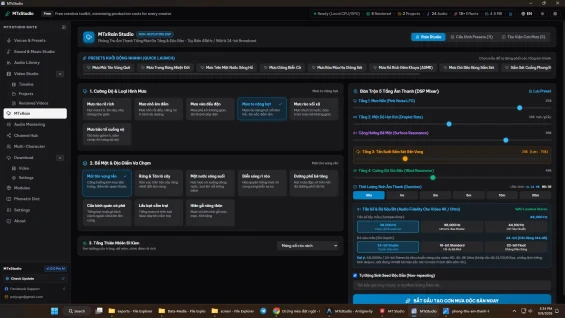
MTxRain - Ambient Rain & Storm Soundscape Studio
On-device procedural DSP synthesis for non-repeating rain, thunder & nature soundscapes
MTxRain Project Hub coordinates the development, algorithmic roadmap, and release pipeline of the procedural rain soundscape generator inside MTxStudio. Built on Rust-powered DSP routines and React-based interface components, this project establishes a native audio synthesis pipeline capable of producing infinite, organic nature soundscapes without relying on third-party cloud APIs.
Architecture and Core Engine Pipeline
The project implements a zero-sample procedural synthesis architecture:
-
DSP Core: Low-latency mathematical waveform generators calculating droplet velocity, density distributions, and resonance filters directly on the host CPU.
-
Audio Routing Pipeline: Dedicated Web Audio API buffers routing five independent synthesis channels into a master summing bus with dynamic limiter protection.
-
Local Persistence: SQLite-backed category and asset database storing preset parameters, rendered sound files, and metadata tags for instant retrieval.
-
Timeline Interop: Bi-directional communication bridge connecting the sound studio interface with the MTxStudio multi-track video sequencing timeline.

MTxDownloader - Bulk Video Media Vault & Queue Manager
Multi-platform bulk video downloader with hardware-aware throttle & audio extractor
MTxDownloader Project Hub manages the technical roadmap, architectural components, and releases of the video asset ingestion subsystem in MTxStudio. Combining a Rust-based concurrent networking backend with an intuitive React management dashboard, the project delivers high-speed video acquisition without taxing system responsiveness during active editing sessions.
Ingestion Architecture and Concurrency Safeguards
The project architecture is structured around four primary subsystems:
- Network Parsing Subsystem: Modular extraction engine designed to resolve dynamic video streams across multiple global and regional platforms while bypassing rate limiting.
- Hardware Telemetry Controller: System monitor interfacing with host OS metrics to prevent resource exhaustion by capping active threads during heavy rendering or encoding phases.
- Media Transcoding Pipeline: Headless FFmpeg worker performing background stream extraction, thumbnail generation, and audio demuxing.
- SQLite Video Vault: Local relational database indexing assets, category mappings, download statistics, and custom tags for high-speed offline querying.
MTxChannelManager - Multi-Platform Video Distribution Hub
Unified channel distribution workflow linking rendered projects to social media channels
MTxChannelManager Project Hub establishes the engineering architecture, distribution pipelines, and version releases for multi-channel video delivery within MTxStudio. Built to eliminate friction between video export and public release, this module provides an integrated operational bridge connecting desktop editing projects to social media audiences.
Distribution Architecture and State Machine
The channel distribution system implements an organized publishing pipeline:
-
Channel Metadata Store: Relational SQLite storage maintaining channel profile attributes, authentication markers, preferred aspect ratios, and operational statuses.
-
Render Interop Engine: Filesystem watcher and project database bridge tracking exported video assets from the MTxStudio rendering pipeline.
-
Publishing State Machine: Deterministic state manager transitioning video assets through Draft, Scheduled, and Published phases with audit timestamping.
-
Desktop Operating System Integration: Native shell execution services invoking platform web upload portals and file manager viewers via secure Tauri system calls.
ElevenLabs Voice & SFX Studio - Neural TTS & Cinematic Sound Effects
Bring-Your-Own-Key cloud neural voice synthesis and cinematic AI sound effects studio
ElevenLabs Voice & SFX Studio Project Hub directs the roadmap, feature architecture, and release cycles for the ElevenLabs cloud audio synthesis integration within MTxStudio. Bridging high-performance Python sidecar microservices with a responsive React desktop workspace, this project delivers studio-quality speech synthesis and custom procedural foley sound design directly into the video editing workflow.
Cloud Synthesis and Local Storage Architecture
The integration architecture harmonizes cloud intelligence with local data ownership:
- BYOK Gateway: Secure local configuration vault encrypting and storing user API keys, communicating over HTTPS with ElevenLabs v1 API endpoints.
- Microservice Sidecar Pipeline: Python engine bridge handling stream downloads, binary caching, format conversion, and temporary disk buffers.
- Relational Asset Repository: SQLite-backed audio catalog tracking prompt histories, voice parameters, output durations, and local file paths for zero-latency offline browsing.
- Timeline Interoperability Engine: Seamless event bridge injecting generated audio clips directly into active video editor multi-track sequences without intermediate file-picker dialogs.
For products sold outside the site - for example, polyxgo on Envato (CodeCanyon.net) - we are the exclusive authors under Envato’s platform. These products can only be sold and supported on Envato. Therefore, you cannot purchase them elsewhere if you wish to receive our official support and updates.
Even if your support period has ended, we will still answer your current technical questions related to the module. However, for any requests that involve bug fixing, troubleshooting, integration, or hands-on assistance, you will need to renew your support first. We hope you understand this requirement. More details: https://help.market.envato.com/hc/en-us/articles/208191263-What-is-Item-Support
Yes. We handle feature integration based on customer requirements and descriptions. If a module has the features you need, you can send a separate request to polyxgo@gmail.com
You can download the product through the purchase receipt or your account dashboard right after you log in at https://headrandom.com/account/login. Installation steps are included in the documentation folder.
For products on Envato (Codecanyon) access the Download section after you log in.
Yes, we provide basic installation and setup support for all purchased products.
Usage depends on the license type. Standard licenses typically allow one installation per purchase.
Updates are delivered through your account dashboard or marketplace where you purchased the product.
Please send us details, screenshots, and steps to reproduce the issue so our support team can assist you. You can create tickets on the system or email polyxgo@gmail.com.
Support duration follows the policy of the marketplace or package you purchased, typically 6–12 months.
Yes, all products include documentation to help you install and use the features. The data is connected to the system for each corresponding product project, and the documentation always provides the latest feature information and instructions from the project.
Yes, we offer custom development based on your requirements. For products sold exclusively and features already available on products listed on Envato, we integrate the additional features and update them through Envato. Only completely different features that require separate handling based on specific business workflows will be processed as a standalone service according to your detailed requirements.
Yes, we provide a live demo so you can test features before purchasing.
You can renew support through your marketplace account or by contacting us directly.
Non-profit organizations, charities, and community initiatives supporting elderly people, children, people with disabilities, and other vulnerable groups are always welcome to reach out to us.
If your organization uses Perfex CRM and requires any of our modules, plugins, or related products, we will gladly provide assistance with installation, customization, training, and long-term operation.
As part of our commitment to supporting meaningful social impact projects, we offer lifetime free support for all products used by eligible non-profit organizations. Our goal is to help you streamline operations, reduce technology costs, and focus more resources on serving your community.
For inquiries and support, please contact us at polyxgo@gmail.com. We will do our best to assist your organization as quickly as possible.
Ratings Source Breakdown
Related Products