MTMedia - Automated Web Recording & Media Creation Suite for Windows & macOS
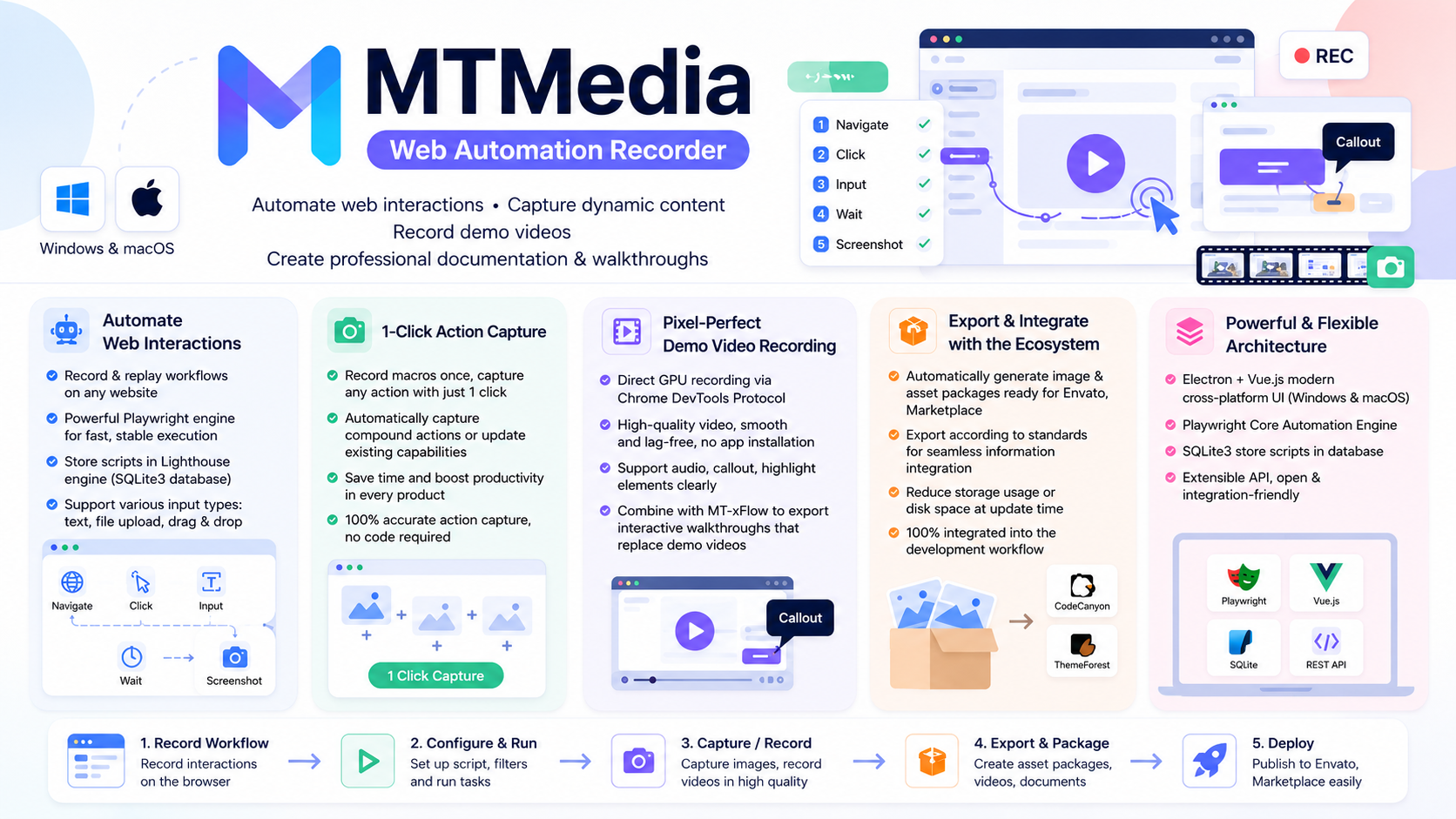
405.28 msMTMedia (Web Automation Recorder) is an all-in-one cross-platform desktop automation solution for Windows and macOS engineered specifically to automate web application interactions, validate visual screen checklists, record smooth web feature demonstration videos, and generate annotated screenshot suites directly during the software development process.
Visual UI Checklist & Bulk Screen Regression Inspection
One of MTMedia's most impactful capabilities is generating an automated, comprehensive Visual Screen Checklist across entire web applications.
Fast Verification for CSS Styling, Layout & Color Palettes
Beyond producing graphics for documentation and marketplace showcase galleries, MTMedia enables developers, UI designers, and QA teams to generate a complete visual gallery of all screens that require validation:
- CSS Style Verification: Instantly confirm that typography, font weights, padding/margin spacing, border radii, and visual accents render exactly as designed across all pages.
- Layout & Responsive Consistency: Inspect complex multi-column layouts, data tables, and form controls across various viewports and scale factors to ensure zero structural breaks.
- Color Palette Harmony: Validate status badges, interactive button themes, alert banners, and tag labels across all views to eliminate color clashing or unreadable contrast.
Substantial Time Savings Over Manual Link-by-Link Inspection
In enterprise web platforms and complex admin portals (such as PolyCMS, Perfex CRM, WordPress, or SaaS apps) featuring dozens or hundreds of views, logging in and manually clicking through every individual URL after each CSS update is tedious, slow, and prone to oversight. With MTMedia, a single click:
- Automatically navigates through every registered application URL in the Screen Checklist.
- Applies corresponding authentication states, viewport dimensions, and annotation overlays.
- Produces a centralized visual matrix, allowing your team to spot visual regressions in seconds instead of hours.
Automated Bulk Screenshot Suites for Digital Marketplaces & Envato
MTMedia streamlines the entire product media workflow, enabling software vendors and developers to generate consistent, high-resolution preview screenshot bundles tailored for global digital marketplaces such as Envato, CodeCanyon, ThemeForest, TemplateMonster, or custom eCommerce stores.
1-Click Automated Bulk Screenshot Solution
Configure your web interaction macros once, and let MTMedia automatically capture hundreds of crisp feature screenshots with a single click whenever you integrate or update new features across plugins, modules, and themes on various web platforms (WordPress, Perfex CRM, Laravel, custom web apps).
Maximized Time Savings for Envato & Marketplace Releases
Eliminate the tedious task of manually taking and cropping screenshots for every software release. On new version updates, simply adjust your macro steps and click once to generate a complete, pristine bundle of product screenshots ready for instant marketplace deployment.
Focus 100% on Core Product Engineering
MTMedia liberates software developers and engineering teams from the manual friction of documentation and screenshot creation. Your team can dedicate 100% of their energy to building and refining new features instead of spending dozens of hours taking and editing UI screenshots.
Eliminate Documentation & Asset Release Risks
Scripted automated screenshot capture guarantees that 100% of your product features, UI views, and documentation screenshots are captured accurately and consistently - completely removing the risk of missing screenshots or outdated marketing materials during product updates.
Interactive Live Browser Studio & On-Canvas Annotations
MTMedia features an in-browser live studio environment, allowing users to configure post-recording screen enhancements directly via an injected floating toolbar.
Rich On-Canvas Annotation Tools
- Callout Tooltips (Notes): Anchor styled dark callout badges with directional arrows pointing directly to target DOM elements.
- Text & Style Overrides: Rewrite element text or apply custom CSS rules (colors, backgrounds, borders, radii) directly on live DOM nodes without modifying source code.
- Sketch Arrows & Bezier Curves: Draw connective bezier arrows with interactive control points, offering multiple line styles (Solid, Dashed, Sketchy, Double, Brush, Fat) and sketch shapes (Checkmark, X-mark, Circle, Heart, Star).
- Numbered Highlight Regions: Draw dashed highlight bounding boxes with numbered badges to spotlight critical UI sections.
- Glow Frames: Apply animated pulsing neon glow frames around target elements to draw user focus.
- Watermarks & Copyright Signatures: Stamp diagonal security matrix patterns or official copyright signatures across pages.
Smart Mini Hover Toolbar & Layer Control
Hovering over any annotation or element on the Live Canvas summons the sleek Dark Linear/Vercel Mini Toolbar (#war-mini-tools), enabling instant modal editing, position locking/unlocking, and deletion with smooth hover buffer bridges.
Direct Screen Registration (Add Screen)
Users can click Add Screen directly on the live floating toolbar to register the current URL into the project's Screen Checklist without switching between windows.
Web Application Automation & Natural Interaction Simulation
Unlike generic OS desktop screen recorders, MTMedia focuses exclusively on automating interactions inside web applications to produce fluid, professional product demo media.
Playwright Core Web Automation Architecture
Automate repetitive browser tasks, form submissions, navigation sequences, and element hovering using a robust Playwright core engine integrated directly into ElectronJS. Every action macro is stored locally in an SQLite3 database for reliable execution and repeatability.
Virtual Mouse Cursor & Gesture Simulation
Enhance video clarity with an interactive virtual cursor overlay that simulates human mouse movement, click ripple animations, and smooth trajectory paths across web page elements.
GPU Screencasting & AI Voice Narration Pipeline
Capture high-frame-rate screencasts and sharp screenshots directly from the Chromium GPU framebuffer via Chrome DevTools Protocol (CDP), avoiding overlay interference from other desktop applications, combined with AI Edge-TTS voiceover narration and FFmpeg MP4 packaging.
MTxFlow Interactive Walkthrough Integration & Full i18n
Export browser scenarios into lightweight, scriptable web walkthroughs powered by MTxFlow, replacing heavy video tutorials with interactive step-by-step user onboarding, backed by full 4-language support (English, Vietnamese, Russian, Chinese).
Documentation & Resources
Explore detailed tutorials, setup guides, and reference articles for MTMedia - Automated Web Recording & Media Creation Suite for Windows & macOS.

What We're Working On
Synthesize natural Vietnamese and English voiceovers from segment narrations asynchronously.
Compile captured JPEG frame sequences and Edge-TTS audio tracks into high-definition MP4 videos.
Recent Releases
Looking for full roadmap, documentation, or interactive release logs?
Explore Our Project PortalFor products sold outside the site - for example, polyxgo on Envato (CodeCanyon.net) - we are the exclusive authors under Envato’s platform. These products can only be sold and supported on Envato. Therefore, you cannot purchase them elsewhere if you wish to receive our official support and updates.
Even if your support period has ended, we will still answer your current technical questions related to the module. However, for any requests that involve bug fixing, troubleshooting, integration, or hands-on assistance, you will need to renew your support first. We hope you understand this requirement. More details: https://help.market.envato.com/hc/en-us/articles/208191263-What-is-Item-Support
Yes. We handle feature integration based on customer requirements and descriptions. If a module has the features you need, you can send a separate request to polyxgo@gmail.com
You can download the product through the purchase receipt or your account dashboard right after you log in at https://headrandom.com/account/login. Installation steps are included in the documentation folder.
For products on Envato (Codecanyon) access the Download section after you log in.
Yes, we provide basic installation and setup support for all purchased products.
Usage depends on the license type. Standard licenses typically allow one installation per purchase.
Updates are delivered through your account dashboard or marketplace where you purchased the product.
Please send us details, screenshots, and steps to reproduce the issue so our support team can assist you. You can create tickets on the system or email polyxgo@gmail.com.
Support duration follows the policy of the marketplace or package you purchased, typically 6–12 months.
Yes, all products include documentation to help you install and use the features. The data is connected to the system for each corresponding product project, and the documentation always provides the latest feature information and instructions from the project.
Yes, we offer custom development based on your requirements. For products sold exclusively and features already available on products listed on Envato, we integrate the additional features and update them through Envato. Only completely different features that require separate handling based on specific business workflows will be processed as a standalone service according to your detailed requirements.
Yes, we provide a live demo so you can test features before purchasing.
You can renew support through your marketplace account or by contacting us directly.
Non-profit organizations, charities, and community initiatives supporting elderly people, children, people with disabilities, and other vulnerable groups are always welcome to reach out to us.
If your organization uses Perfex CRM and requires any of our modules, plugins, or related products, we will gladly provide assistance with installation, customization, training, and long-term operation.
As part of our commitment to supporting meaningful social impact projects, we offer lifetime free support for all products used by eligible non-profit organizations. Our goal is to help you streamline operations, reduce technology costs, and focus more resources on serving your community.
For inquiries and support, please contact us at polyxgo@gmail.com. We will do our best to assist your organization as quickly as possible.
Ratings Source Breakdown
Related Products