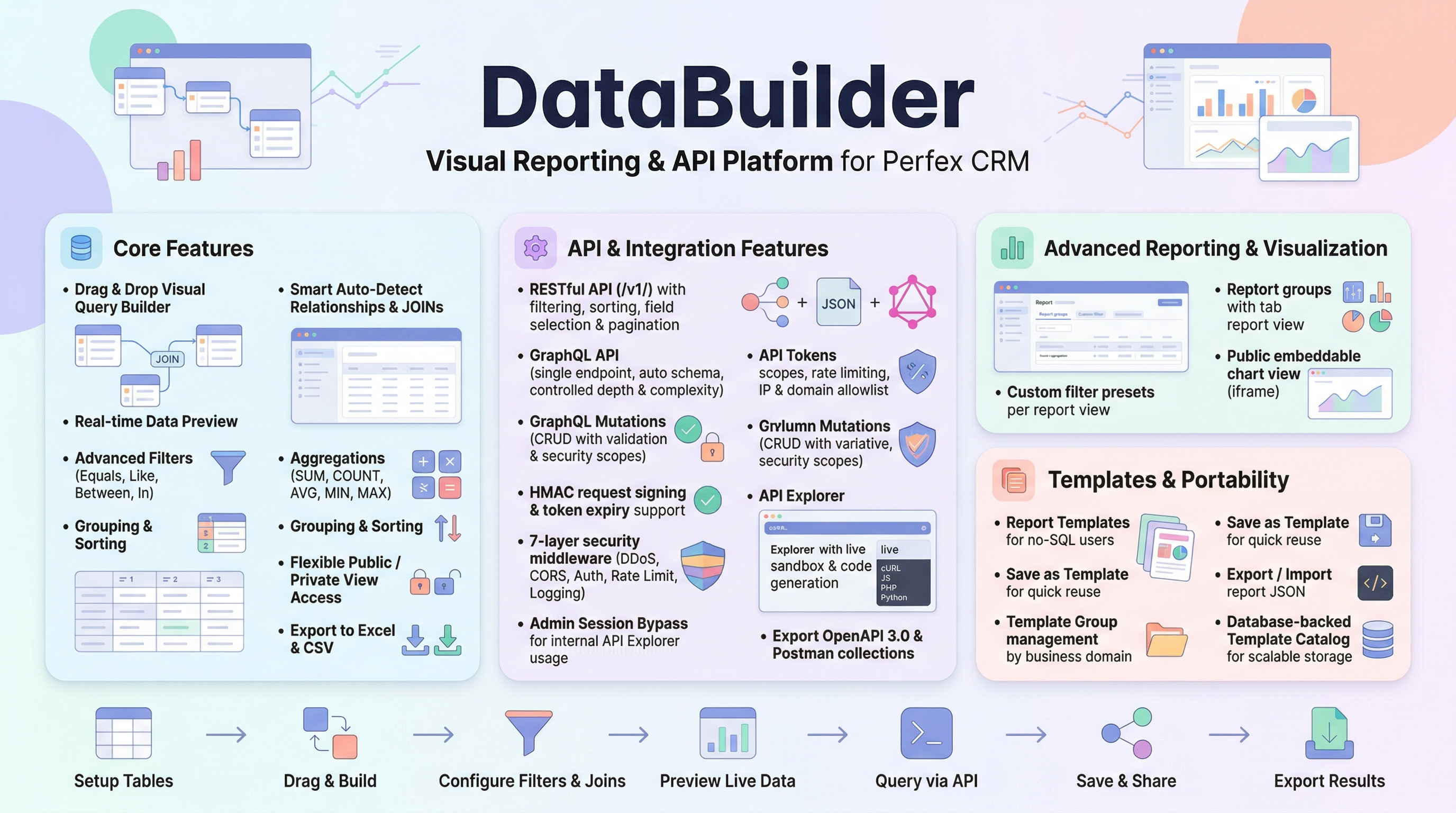
Data Builder - Visual Reporting, REST API & GraphQL for Perfex CRM

358.05 ms
$59
Verified Coupons & Special Deals Save up to 20%
1 deals
14 sold 5.0 (3 reviews) 404 views
SKU databuilder-perfex-VI
Data Builder for Perfex CRM

Documentation & Resources

Explore detailed tutorials, setup guides, and reference articles for Data Builder - Visual Reporting, REST API & GraphQL for Perfex CRM.
View All Docs
Showcase: Sharing Perfex CRM Reports with Clients via Embeds & Iframes
Modules for Perfex CRM 3 min read

Showcase: Sharing Perfex CRM Reports with Clients via Embeds & Iframes

Transparency and communication are the cornerstones of strong client relationships. When managing projects, finances, or...

Optimizing Perfex CRM Reporting: How Data Builder's Cache & Index Advisor Turbocharge Performance
Modules for Perfex CRM 3 min read

Optimizing Perfex CRM Reporting: How Data Builder's Cache & Index Advisor Turbocharge Performance

When dealing with large datasets in Perfex CRM, complex reporting queries can slow down your system. Whether you are gen...
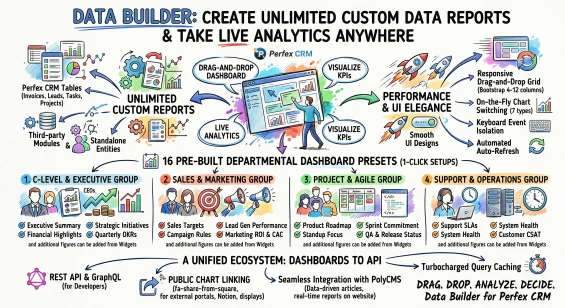
Unlimited Multi-Chart Reporting Dashboards - The Ultimate Live Data Consolidation Engine for Perfex CRM
Modules for Perfex CRM 5 min read

Unlimited Multi-Chart Reporting Dashboards - The Ultimate Live Data Consolidation Engine for Perfex CRM

Create Unlimited Custom Data Reports & Take Live Analytics AnywhereIf you need a powerful, diverse, easy-to-use data...

PolyCMS REST API Guide
Modules for Perfex CRM 6 min read

PolyCMS REST API Guide

REST API Overview PolyCMS includes a robust REST API, allowing you to use it as a headless CMS. You can fetch content t...

Report Templates and JSON Portability in Data Builder
Modules for Perfex CRM 3 min read

Report Templates and JSON Portability in Data Builder

Scaling Your CRM Reporting Creating a comprehensive, cross-module report in Perfex CRM is incredibly valuable. But once...

Mastering Per-Table CRUD Permissions in Perfex CRM
Modules for Perfex CRM 3 min read

Mastering Per-Table CRUD Permissions in Perfex CRM

The Danger of the Global "Write Access" Toggle When connecting external applications - like Zapier, mobile app...

Why CRM Systems Need APIs for Modern Integrations
Modules for Perfex CRM 2 min read

Why CRM Systems Need APIs for Modern Integrations

The Data Silo Problem Your CRM holds client records, invoices, project timelines, and task assignments. But without an A...

What is Perfex CRM API? How to Access and Use CRM Data
Modules for Perfex CRM 4 min read

What is Perfex CRM API? How to Access and Use CRM Data

Introduction Access CRM data without direct database queries, connect external systems, and build scalable integrations...

REST vs GraphQL for CRM: Key Differences Explained
Modules for Perfex CRM 2 min read

REST vs GraphQL for CRM: Key Differences Explained

Two API Approaches, One Module Data Builder for Perfex CRM provides both REST API and GraphQL from a single module. They...

Perfex CRM GraphQL Guide: Flexible Data Querying Explained
Modules for Perfex CRM 2 min read

Perfex CRM GraphQL Guide: Flexible Data Querying Explained

Why GraphQL for CRM Traditional REST APIs return fixed data structures. GraphQL lets you request exactly the fields you...

Perfex CRM API & GraphQL Integration: Complete Guide to Unlock CRM Data
Modules for Perfex CRM 2 min read

Perfex CRM API & GraphQL Integration: Complete Guide to Unlock CRM Data

Unlock Your CRM Data Perfex CRM stores valuable business data across dozens of tables: clients, invoices, projects, task...

Perfex CRM API Filtering, Sorting, and Pagination Guide
Modules for Perfex CRM 2 min read

Perfex CRM API Filtering, Sorting, and Pagination Guide

The Data Builder REST API for Perfex CRM provides high-performance data querying with robust filtering, multi-field sort...

What We're Working On

No feature updates scheduled currently.

Recent Releases

v2.4.0 (19/09/2026)
NEW
-API Security Banner Setting: Added a dedicated "Show API Security Banner" option in Data Builder API settings so admins can hide the warning banner without changing the real API security state. (September 19, 2026)
-List of Estimates Report Template: Added pre-built template for comprehensive list of estimates with client details, status, and total amount KPI metrics. (September 19, 2026)
-Weekly Date Grouping: Added two new date_grouping modes - "Week Number" (ISO year-week, e.g. 2026-W38) and "Week (Monday)" (Monday start date of each week). These modes can be applied to ANY date/datetime field on ANY table via the Visual Query Builder, enabling weekly time-series reports for invoices, expenses, payments, tasks, leads, tickets, or any custom data. (September 19, 2026)
-Weekly Revenue Summary (Demo Preset): Sample template demonstrating weekly grouping on invoices - total revenue, tax, and invoice count per week. (September 19, 2026)
-Weekly Payment Collections (Demo Preset): Sample template demonstrating weekly grouping on payments - payment count, total collected, and average payment size per week. (September 19, 2026)
IMPROVEMENTS & STABILITY
-Standardized Webhook Sandbox Receiver architecture for improved reliability and clearer integration workflows. (September 19, 2026)
-Enhanced Sandbox simulator with payload size limits and automatic file cleanup. (September 19, 2026)
-Added automated background maintenance routine for cleaner module operation. (September 19, 2026)
-General stability improvements and code optimization. (September 19, 2026)
v2.3.0 (28/05/2026)
NEW
-Dashboard View: Create dashboards from built-in Presets (CEO Overview, Finance Summary, Marketing, Project Manager, Support Center) or build Custom dashboards from scratch (May 24, 2026)
-Dashboard Switcher: switch between dashboards instantly via dropdown, last-used dashboard remembered per user (May 24, 2026)
-Widget Library: 4 widget types - Chart, DataTable, KPI Card, Text/Note (May 24, 2026)
-Chart Widget supports 7 chart types: Bar, Line, Area, Pie, Doughnut, Radar, Polar Area - switchable on-the-fly (May 24, 2026)
-Drag-and-drop widget layout with configurable column widths (May 24, 2026)
-Auto-refresh with configurable interval (1/5/10/30 minutes) (May 24, 2026)
-Share dashboards with team members (May 24, 2026)
-Export All CSV: export the entire filtered report as CSV, bypassing page-size limits (May 24, 2026)
-Server-Side Query Caching with configurable Cache TTL from Admin Builder UI (May 24, 2026)
-Admin Force Refresh: "Clear Cache" button for real-time data on demand (May 24, 2026)
-Index Advisor: analyze view configurations and suggest optimal SQL indexes (May 24, 2026)
-Interactive Embed Report Generator with chart/table toggle and Dark Theme (May 24, 2026)
-Centralized Cache Manager: bulk enable, disable, and clear cache across all reports (May 24, 2026)
CHANGED
-Confirmation Modals: changed native confirm dialogs in "Report Groups" and "Webhooks" to styled SweetAlert2 modals for consistency with "Delete View" (May 24, 2026)
-Webhooks Action Buttons: styled actions inside the webhooks management view with clean, modern flat icons to match the /admin/data_builder view style (May 24, 2026)
FIXED
-Expression Join Totals: fixed Total row calculation in "Monthly Expense vs Payment" and "Net Result by Month" templates to correctly compute SUM(Payment) - SUM(Expense); negative values now display properly (May 24, 2026)
-Embed Report Styling: fixed Total row dark/light mode colors in public embed table (May 24, 2026)
-Chart Zoom UX: hide zoom controls for chart types that do not support axis zooming (Pie, Doughnut, Radar, PolarArea) (May 24, 2026)
v2.2.4 (18/05/2026)
NEW
-Monthly Expense vs Payment (Expression Join): An essential cash flow comparison template and business financial health dashboard that empowers CFOs to track monthly expenses vs payments, identifying liquidity gaps within their Perfex CRM finance reports. (May 17, 2026)
-Net Result by Month (Payment - Expense): An automated business profitability tracking tool and monthly profit and loss template that calculates payment minus expense, helping owners perform accurate P&L reporting and net result analysis. (May 17, 2026)
-Revenue by Year & Revenue by Quarter: A comprehensive quarterly revenue report and annual sales revenue template for sales directors to track invoice volume and measure Perfex CRM year-over-year growth for quarterly business performance reporting. (May 17, 2026)
-Payments (Income) by Quarter & Year: An advanced cash collection report and payments received dashboard designed for accounts receivable analytics, enabling teams to perform accurate quarterly income tracking and cash flow generation. (May 17, 2026)
-Expenses by Quarter & Year: A detailed quarterly expense report and annual corporate spending analysis that provides operations teams with an operational cost dashboard and expense transaction tracking to streamline budget management. (May 17, 2026)
v2.2.3 (05/05/2026)
CHANGED
-Time Duration Formatter: Introduced a new "Time Duration (HH:MM)" formatter to the Builder interface, allowing decimal hours to be properly displayed as `HH:MM` while maintaining backend aggregation integrity. (May 5, 2026)
-Thousands Separator in Time Formats: Enhanced the time duration formatting logic to include thousands separators for extreme hour counts (e.g., `57,614:01`). (May 5, 2026)
-Time Breakdown Logic: Added dynamic "sub-hours" rendering (Days, Weeks, Months, Years) into the new `time_duration` formatter for durations exceeding 24 hours. (May 5, 2026)
-Preset Updates: Updated the "Timesheet Summary by Project & Staff" template preset to feature side-by-side time columns: "Time (h)" utilizing the new `time_duration` formatter and "Time (decimal)" retaining the standard `number` formatter for better reporting flexibility. (May 5, 2026)
v2.2.2 (02/05/2026)
NEW
-Date Macros: Officially implemented {{CURRENT_WEEK_START}} and {{CURRENT_MONTH_START}} dynamic date macros into the SQL parser (Runtime_model) and added quick-access UI buttons to the Builder interface. Improved CURDATE date generation to ensure exact bounds matching using DATE_FORMAT formatting. (May 1, 2026)
CHANGED
-Frontend Consistency: Extended the time-breakdown formatter logic across all Data Builder datatables, including runtime view, the Data Preview modal in the builder interface, and the public embedded report viewer. (May 1, 2026)
-Smart Time Breakdown: Implemented dynamic "sub-hours" rendering (Days, Weeks, Months, Years) with thousand separators for long-duration task hour columns exceeding 24 hours. (May 1, 2026)
-Template Preset Modal: Unified status badge and button sizing with consistent gap spacing. Shortened "Already in Views/Reports" label to "Saved View" for cleaner layout. (May 1, 2026)
-Builder Tips & Guide: Added a contextual help modal (?) to the View Builder toolbar describing Templates, Save as Template, JSON Import/Export, Preview Data, and Preview SQL features. (May 1, 2026)
-UI Inconsistency: Removed custom bootstrap-select checkbox styling in runtime.css that was overriding and conflicting with standard Perfex CRM core UI components. (May 1, 2026)
FIXED
-Timesheet Calculation: Standardized hour calculations across all Data Builder templates (e.g., timesheet-by-project-staff, billable-hours) using robust SQL Unix timestamp arithmetic ((COALESCE(end_time, UNIX_TIMESTAMP()) - start_time) / 3600) instead of the unreliable TIMESTAMPDIFF, ensuring accurate decimals for both active and completed timers. (May 1, 2026)
-Timestamp Filtering Bug: Fixed a critical issue where filtering by date on UNIX timestamp columns (like tbltaskstimers.start_time) failed due to MySQL string vs integer comparison. The query builder now automatically wraps known UNIX fields in FROM_UNIXTIME(). (May 1, 2026)
-Dynamic Filter Duplication: Resolved a logical flaw in Runtime_model where dynamic UI filters were redundantly appended without FROM_UNIXTIME formatting via legacy apply_filters methods, preventing macros like {{CURDATE}} from accurately returning data. (May 1, 2026)
-Footer Totals Ignoring Filters: Fixed a bug where the footer Total row in report views always showed aggregated values from the full dataset instead of recalculating based on the user's active dynamic filters. The totals rebuild query now passes dynamic_filters to build_query. (May 1, 2026)
-JSON Import Hardening: Added file size limit (2 MB), version compatibility check (2.x), strict Array.isArray validation for tables/fields, and XSS-safe HTML escaping for user-controlled name/description before rendering in the confirmation dialog. (May 1, 2026)

Looking for full roadmap, documentation, or interactive release logs?

Explore Our Project Portal
Why are some modules, plugins, or products not available for direct purchase on the site?

For products sold outside the site - for example, polyxgo on Envato (CodeCanyon.net) - we are the exclusive authors under Envato’s platform. These products can only be sold and supported on Envato. Therefore, you cannot purchase them elsewhere if you wish to receive our official support and updates.

My Envato support period has expired. Can I still receive assistance?

Even if your support period has ended, we will still answer your current technical questions related to the module. However, for any requests that involve bug fixing, troubleshooting, integration, or hands-on assistance, you will need to renew your support first. We hope you understand this requirement. More details: https://help.market.envato.com/hc/en-us/articles/208191263-What-is-Item-Support

Can I get support if I only need to integrate some features from a module or plugin?

Yes. We handle feature integration based on customer requirements and descriptions. If a module has the features you need, you can send a separate request to polyxgo@gmail.com

How do I download and install the product?

You can download the product through the purchase receipt or your account dashboard right after you log in at https://headrandom.com/account/login. Installation steps are included in the documentation folder.

For products on Envato (Codecanyon) access the Download section after you log in.

Do you provide installation or setup support?

Yes, we provide basic installation and setup support for all purchased products.

Can I use the product on multiple sites?

Usage depends on the license type. Standard licenses typically allow one installation per purchase.

How do I receive updates after purchase?

Updates are delivered through your account dashboard or marketplace where you purchased the product.

What should I do if I encounter an error or conflict?

Please send us details, screenshots, and steps to reproduce the issue so our support team can assist you. You can create tickets on the system or email polyxgo@gmail.com.

How long does technical support last after purchase?

Support duration follows the policy of the marketplace or package you purchased, typically 6–12 months.

Do you provide documentation or a user guide?

Yes, all products include documentation to help you install and use the features. The data is connected to the system for each corresponding product project, and the documentation always provides the latest feature information and instructions from the project.

Can I request customization or additional features?

Yes, we offer custom development based on your requirements. For products sold exclusively and features already available on products listed on Envato, we integrate the additional features and update them through Envato. Only completely different features that require separate handling based on specific business workflows will be processed as a standalone service according to your detailed requirements.

Is there a demo site available for testing?

Yes, we provide a live demo so you can test features before purchasing.

How do I renew support after it expires?

You can renew support through your marketplace account or by contacting us directly.

Non-profit organizations, charities, and community initiatives supporting elderly people, children, people with disabilities, and other vulnerable groups are always welcome to reach out to us.

If your organization uses Perfex CRM and requires any of our modules, plugins, or related products, we will gladly provide assistance with installation, customization, training, and long-term operation.

As part of our commitment to supporting meaningful social impact projects, we offer lifetime free support for all products used by eligible non-profit organizations. Our goal is to help you streamline operations, reduce technology costs, and focus more resources on serving your community.

For inquiries and support, please contact us at polyxgo@gmail.com. We will do our best to assist your organization as quickly as possible.

This product is synced with Envato Market. You can view official customer feedback or write a review directly on Envato.
Rate & Review on Envato

Average Rating

5.0

Based on 3 ratings

Ratings Source Breakdown

Envato Market 5.0 ★ (3 ratings)
Local Website 0.0 ★ (0 reviews)
Merged Total 5.0 ★ (3 ratings)
This product is synced with Envato Market. You can view official customer discussions or leave a comment directly on Envato.
Comments on Envato

Loading reviews...

Sign in to your account

Please log in to leave a comment or review.

Or continue with social account
Purchased on Envato Market? Log in to sync your purchase or verify your license.