ElevenLabs Voice & SFX Studio - Neural TTS & Cinematic Sound Effects
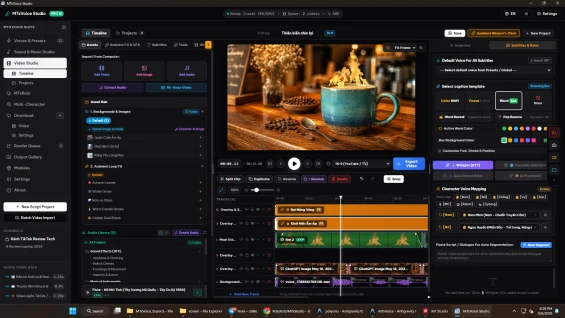
295.73 msElevenLabs Voice & SFX Studio integrates ElevenLabs' premier neural speech synthesis and text-to-sound-effects generation directly into the MTxStudio desktop ecosystem, allowing video producers to synthesize expressive voiceovers and bespoke cinematic audio textures without switching between browser tabs. Powered by a transparent Bring-Your-Own-Key (BYOK) architecture, this module stores all rendered audio stems, prompts, and voice configurations locally on your physical storage, combining cutting-edge cloud audio intelligence with offline project privacy.
Bring Your Own Key (BYOK) Direct Cloud Integration
Traditional software subscriptions often bundle cloud audio credits with high profit markups, restricted usage tiers, and opaque monthly quotas. ElevenLabs Voice & SFX Studio takes a creator-first approach by enabling direct API connectivity:
- Zero-Markup API Connectivity: Use your existing ElevenLabs developer or personal account API key directly with zero intermediary platform fees.
- Latency Testing & Key Diagnostics: Real-time ping testing monitors API latency and validates account permissions before starting generation tasks.
- Encrypted Local Storage: Your credentials remain stored exclusively in your local machine configuration, never relayed through external telemetry servers.
Text-to-Sound-Effects (SFX) Cinematic Engine
Sourcing specialized sound effects from generic stock libraries often leads to repetitive audio clichés and hours spent searching through low-quality audio files. This module gives video editors the power to describe exact cinematic sounds and have them generated on demand:
- Prompt-Driven Sound Design: Generate organic foley, futuristic sci-fi pulses, explosive impacts, environmental textures, and subtle transitions from natural language descriptions.
- Configurable Audio Duration: Adjust sound effect durations from 0.5-second micro-transients up to 22-second ambient soundscapes.
- Prompt Influence Tuning: Fine-tune the balance between strict adherence to your prompt and algorithmic creative variation.
- Cinematic Preset Chips: Jump-start audio creation with quick-access preset chips covering trailer whooshes, footsteps, opening doors, crackling campfires, and magical chimes.
Expressive Multilingual Neural Voiceover (TTS)
High-impact video storytelling demands nuanced vocal delivery with realistic breath pauses, dynamic emotion, and authentic pacing:
- Next-Generation Multilingual Models: Native integration with ElevenLabs Multilingual v2 and Turbo models, delivering natural pronunciation across dozens of languages.
- Voice Library Synchronization: Browse and audition available voice profiles with detailed gender, accent, and stylistic tags directly inside the desktop interface.
- Granular Acoustic Controls: Independently dial in Voice Stability, Clarity and Similarity Boost, and Style Exaggeration to tailor performances from authoritative documentary narrations to energetic commercial reads.
Local Audio Vault and Video Editor Interoperability
Audio creation is only half the battle; organizing and placing audio clips into your video timeline is where productivity is won:
- Persistent Local Audio Vault: Automatically catalogs every generated voice take and sound effect in an internal SQLite database, tracking prompts, voice IDs, durations, and file sizes.
- Search and Classification: Rapidly filter your audio history by generation type (SFX or TTS), creation dates, and descriptive keywords.
- 1-Click Timeline Track Insertion: Insert newly generated voiceovers and sound effects directly onto dedicated audio tracks on the active MTxStudio multi-track video timeline.
- Direct Operating System Access: Open the local destination storage folder with a single click or export uncompressed master files for secondary editing in external digital audio workstations (DAWs).
What We're Working On
No feature updates scheduled currently.
Recent Releases
ElevenLabs Voice & SFX Studio v1.0.0 connects premier cloud audio generation directly to MTxStudio:
- Bring Your Own Key (BYOK) architecture for direct ElevenLabs API connectivity with local credential storage.
- Text-to-SFX cinematic generator supporting custom prompts, duration controls up to 22 seconds, and prompt influence tuning.
- Built-in cinematic SFX preset chips for common trailer, game, and narrative sound effects.
- Expressive multilingual TTS powered by Eleven Multilingual v2 and Turbo models.
- Fine-grained voice parameters: Stability, Similarity Boost, and Style Exaggeration.
- Local SQLite audio vault indexing generated files with search and type filtering.
- Direct 1-click insertion onto MTxStudio Video Editor multi-track timeline tracks.
Looking for full roadmap, documentation, or interactive release logs?
Explore Our Project PortalFor products sold outside the site - for example, polyxgo on Envato (CodeCanyon.net) - we are the exclusive authors under Envato’s platform. These products can only be sold and supported on Envato. Therefore, you cannot purchase them elsewhere if you wish to receive our official support and updates.
Even if your support period has ended, we will still answer your current technical questions related to the module. However, for any requests that involve bug fixing, troubleshooting, integration, or hands-on assistance, you will need to renew your support first. We hope you understand this requirement. More details: https://help.market.envato.com/hc/en-us/articles/208191263-What-is-Item-Support
Yes. We handle feature integration based on customer requirements and descriptions. If a module has the features you need, you can send a separate request to polyxgo@gmail.com
You can download the product through the purchase receipt or your account dashboard right after you log in at https://headrandom.com/account/login. Installation steps are included in the documentation folder.
For products on Envato (Codecanyon) access the Download section after you log in.
Yes, we provide basic installation and setup support for all purchased products.
Usage depends on the license type. Standard licenses typically allow one installation per purchase.
Updates are delivered through your account dashboard or marketplace where you purchased the product.
Please send us details, screenshots, and steps to reproduce the issue so our support team can assist you. You can create tickets on the system or email polyxgo@gmail.com.
Support duration follows the policy of the marketplace or package you purchased, typically 6–12 months.
Yes, all products include documentation to help you install and use the features. The data is connected to the system for each corresponding product project, and the documentation always provides the latest feature information and instructions from the project.
Yes, we offer custom development based on your requirements. For products sold exclusively and features already available on products listed on Envato, we integrate the additional features and update them through Envato. Only completely different features that require separate handling based on specific business workflows will be processed as a standalone service according to your detailed requirements.
Yes, we provide a live demo so you can test features before purchasing.
You can renew support through your marketplace account or by contacting us directly.
Non-profit organizations, charities, and community initiatives supporting elderly people, children, people with disabilities, and other vulnerable groups are always welcome to reach out to us.
If your organization uses Perfex CRM and requires any of our modules, plugins, or related products, we will gladly provide assistance with installation, customization, training, and long-term operation.
As part of our commitment to supporting meaningful social impact projects, we offer lifetime free support for all products used by eligible non-profit organizations. Our goal is to help you streamline operations, reduce technology costs, and focus more resources on serving your community.
For inquiries and support, please contact us at polyxgo@gmail.com. We will do our best to assist your organization as quickly as possible.
Ratings Source Breakdown
Related Products