OmniMention for Perfex CRM - Universal Mention & Entity Tagging Ecosystem
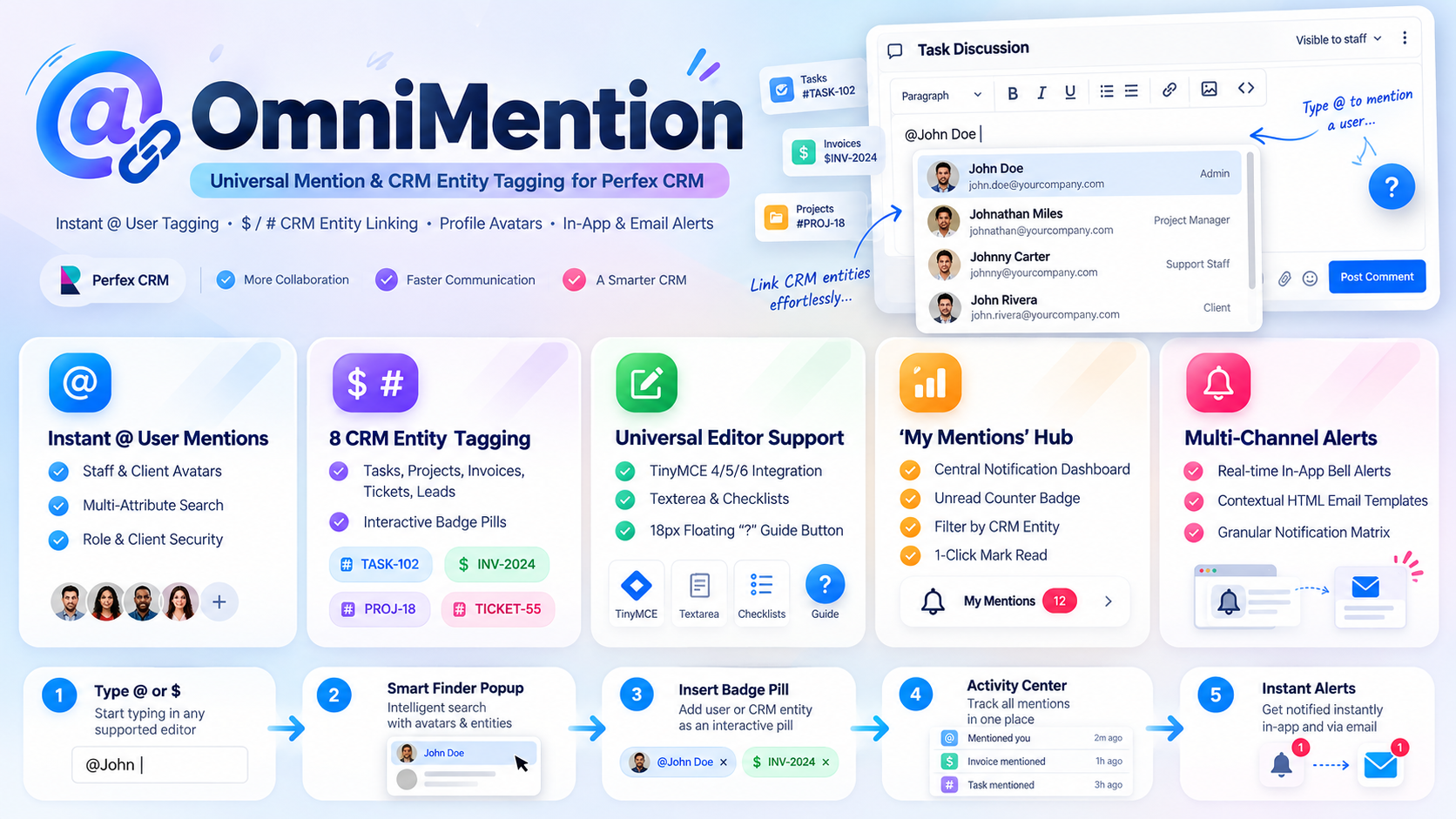
254.23 msOmniMention delivers a high-speed, enterprise-grade user tagging and CRM entity cross-referencing ecosystem built specifically for Perfex CRM. By embedding intelligent autocomplete triggers directly into TinyMCE rich text editors, task checklists, ticket replies, and discussion textareas, OmniMention empowers administrators, project managers, and client contacts to tag colleagues using @ and link CRM records using $ or # without leaving their writing flow.
Eliminate Communication Silos in Perfex CRM
In standard Perfex CRM deployments, project discussions, task notes, and support tickets remain disconnected from the team members and records they reference. Team members waste valuable minutes copying invoice URLs, retyping project codes, and manually tracking down colleagues to verify whether a comment was seen.
OmniMention completely transforms internal collaboration by unifying real-time mentions and cross-module referencing into an intuitive, responsive system. Whether you are assigning urgent task feedback, referencing an unpaid invoice in a project milestone, or collaborating with client contacts in the portal, OmniMention keeps every stakeholder informed through automated in-app bell alerts and contextual email notifications.
Instant User Mentions (@ Trigger)
Type @ anywhere in a supported input to open an instant user finder panel:
- Multi-Attribute Search: Search administrators, staff members, and client contacts instantly by first name, last name, email address, department, or company name.
- Real Profile Avatars: Renders authentic user profile avatars inside the finder modal and on inserted badge pills, with graceful fallback to clean vector icons.
- Role Badges: Visual indicators clearly distinguish Administrators, Staff Members, and Client Contacts to prevent accidental external tagging.
- Deep-Linked Profiles: Clicking any rendered user badge pill instantly navigates to that staff member or contact profile.
CRM Entity Tagging ($ and # Triggers)
Cross-reference any CRM record inside comments, descriptions, or notes without manually switching tabs or copying URLs. Type $ or # to query 8 core Perfex CRM modules:
- Tasks: Insert interactive pills with task ID, title, status badge, and priority.
- Projects: Reference project code, project name, customer name, and deadline.
- Tickets: Link support tickets with subject, department, and urgency level.
- Invoices: Tag invoices showing invoice number, client organization, and payment status.
- Leads: Reference leads with full contact name, company, and pipeline status.
- Proposals: Link proposals displaying proposal title, total value, and open status.
- Estimates: Reference estimate number, client association, and expiry date.
- Contracts: Link active contracts with contract subject, client, and validity range.
Each entity type features distinct color accents and FontAwesome icons matching Perfex CRM design standards.
Universal Editor & Form Compatibility
OmniMention works natively across all text input surfaces in Perfex CRM without requiring workflow changes:
- TinyMCE Rich Editors (v4, v5, and v6): Rich interactive HTML badge pills with keyboard navigation (Up, Down, Enter, ESC).
- Plain Textareas & Form Fields: Converts mentions into lightweight, resilient Markdown tokens (such as
[John Doe](staff:5)and[INV-001](invoice:1)), guaranteeing clean storage in database text columns without broken HTML tags. - Task Todo Checklists: Full autocompleter and pill decorator support for inline checklist items and popover modals.
- Intelligent Input Guard: Automatically excludes internal select dropdowns, search boxes, and table filters to prevent unintended popup activations.
Dedicated My Mentions Activity Hub
Accessible directly from the Perfex CRM sidebar navigation under @ OmniMention > My Mentions, this collaborative center ensures you never miss a tag:
- Real-Time Unread Counter: Live badge counter in the navigation menu shows pending unread mentions at all times.
- Filter Tabs: Toggle between All Mentions and Unread Mentions with one click.
- Entity Type Filtering: Filter mentions originating specifically from Tasks, Projects, Invoices, Tickets, Leads, Proposals, Estimates, or Contracts.
- Instant Search: Search through mention snippets using instant client-side keyword filtering.
- Clean Preview Decoders: Full UTF-8 and Vietnamese diacritic decoding that strips raw markdown while preserving accurate context.
- Batch Actions: Mark individual mentions as read or utilize Mark All as Read with SweetAlert2 confirmation.
High-Performance Composite Database Indexing
Engineered for enterprise databases processing thousands of daily comments, OmniMention avoids unindexed scans and filesort bottlenecks through tailored composite database indexes:
tblomnimention_mentions: Equipped with(target_type, target_id, id DESC),(target_type, target_id, is_read, id DESC), and covering indexes for comment checks, delivering O(limit) zero-filesort timeline reads and in-memory execution.tblomnimention_entity_tags: Enforces unique composite keys(source_rel_type, source_rel_id, tagged_entity_type, tagged_entity_id)for O(1) duplicate prevention directly at the database engine level.
Role-Based Security & Public Guest Isolation
- Decorator-Only Guest Mode: Public visitors viewing external contracts, proposals, or estimates operate in Decorator-Only mode. Autocomplete endpoints, search queries, and help icons are strictly disabled to protect internal CRM data.
- Client Portal Scopes: Client contacts can only mention authorized team members and search their own company records when portal mentions are enabled in settings.
- Strict Injection Defense: Input sanitization via HTMLPurifier, 100% CodeIgniter parameter binding, and BASEPATH script guards ensure total data integrity.
Accelerate Your Team Collaboration Today
OmniMention eliminates communication friction and keeps every project on track. Install the module, activate your preferred trigger keys, and experience seamless user tagging and CRM entity cross-referencing across your entire Perfex CRM system.
Documentation & Resources
Explore detailed tutorials, setup guides, and reference articles for OmniMention for Perfex CRM - Universal Mention & Entity Tagging Ecosystem.
How to Tag Users and Link CRM Records in Perfex CRM with OmniMention
Tagging colleagues and cross-referencing CRM records directly inside project discussions, task notes, and support ticket...
Complete Guide to Install and Use OmniMention for Perfex CRM
OmniMention transforms communication across Perfex CRM by enabling instant @ user tagging and $ or # entity linking dire...
What We're Working On
No feature updates scheduled currently.
Recent Releases
Looking for full roadmap, documentation, or interactive release logs?
Explore Our Project PortalFor products sold outside the site - for example, polyxgo on Envato (CodeCanyon.net) - we are the exclusive authors under Envato’s platform. These products can only be sold and supported on Envato. Therefore, you cannot purchase them elsewhere if you wish to receive our official support and updates.
Even if your support period has ended, we will still answer your current technical questions related to the module. However, for any requests that involve bug fixing, troubleshooting, integration, or hands-on assistance, you will need to renew your support first. We hope you understand this requirement. More details: https://help.market.envato.com/hc/en-us/articles/208191263-What-is-Item-Support
Yes. We handle feature integration based on customer requirements and descriptions. If a module has the features you need, you can send a separate request to polyxgo@gmail.com
You can download the product through the purchase receipt or your account dashboard right after you log in at https://headrandom.com/account/login. Installation steps are included in the documentation folder.
For products on Envato (Codecanyon) access the Download section after you log in.
Yes, we provide basic installation and setup support for all purchased products.
Usage depends on the license type. Standard licenses typically allow one installation per purchase.
Updates are delivered through your account dashboard or marketplace where you purchased the product.
Please send us details, screenshots, and steps to reproduce the issue so our support team can assist you. You can create tickets on the system or email polyxgo@gmail.com.
Support duration follows the policy of the marketplace or package you purchased, typically 6–12 months.
Yes, all products include documentation to help you install and use the features. The data is connected to the system for each corresponding product project, and the documentation always provides the latest feature information and instructions from the project.
Yes, we offer custom development based on your requirements. For products sold exclusively and features already available on products listed on Envato, we integrate the additional features and update them through Envato. Only completely different features that require separate handling based on specific business workflows will be processed as a standalone service according to your detailed requirements.
Yes, we provide a live demo so you can test features before purchasing.
You can renew support through your marketplace account or by contacting us directly.
Non-profit organizations, charities, and community initiatives supporting elderly people, children, people with disabilities, and other vulnerable groups are always welcome to reach out to us.
If your organization uses Perfex CRM and requires any of our modules, plugins, or related products, we will gladly provide assistance with installation, customization, training, and long-term operation.
As part of our commitment to supporting meaningful social impact projects, we offer lifetime free support for all products used by eligible non-profit organizations. Our goal is to help you streamline operations, reduce technology costs, and focus more resources on serving your community.
For inquiries and support, please contact us at polyxgo@gmail.com. We will do our best to assist your organization as quickly as possible.
Ratings Source Breakdown
Related Products